No description
| src | ||
| .dockerignore | ||
| .gitignore | ||
| beat-harvester.service | ||
| docker-compose.yaml | ||
| Dockerfile | ||
| go.mod | ||
| LICENSE.txt | ||
| main.go | ||
| Makefile | ||
| README.md | ||
| screen1.png | ||


Beat harvester
(another ytdlp gui)
A music downloader app with a modern web interface. Built with Go for maximum performance and easy deployment.
Features
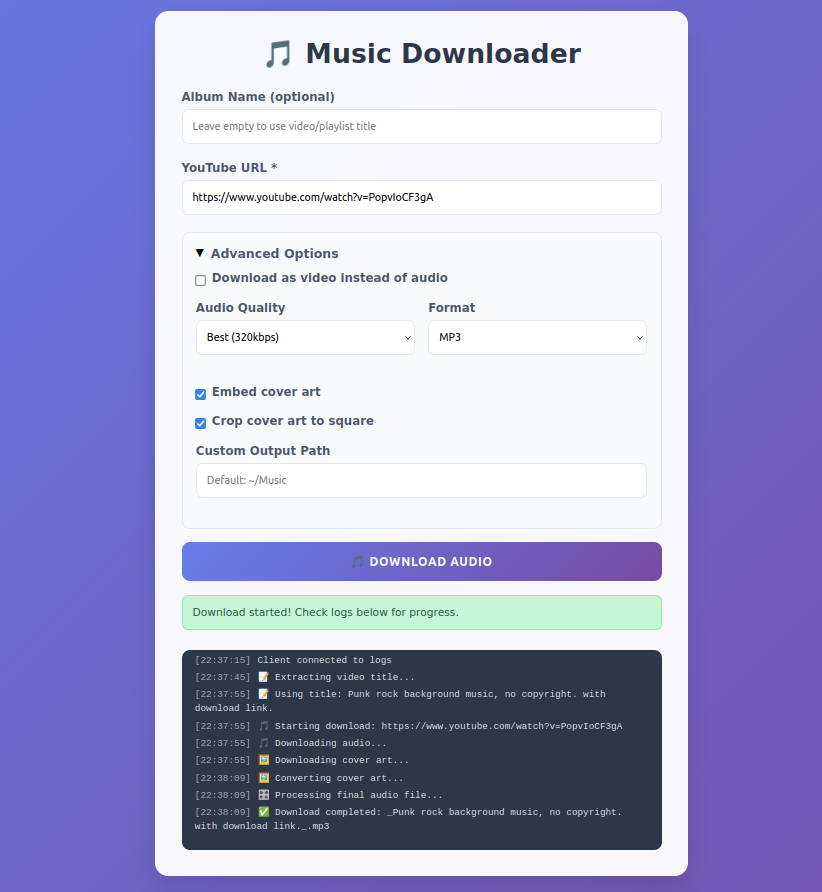
- Modern Web UI - Clean, responsive interface with real-time updates
- High-Quality Downloads - Up to 320kbps - limited by origin, with automatic metadata embedding
- Smart Thumbnails - Auto-crop and embed album artwork
- Mobile-Friendly - Responsive design for all devices
- Efficiency: - Idle memory usage: ~5MB
Screenshot:
Quick Start
1. Build from Source
# Clone repository
git clone https://github.com/JRoshthen1/beat-harvester.git
cd beat-harvester

# Install system dependencies
make install-deps-ubuntu  # Ubuntu/Debian
# or
make install-deps-centos  # CentOS/RHEL
# or
make install-deps-macos   # macOS

# Build and run
make build
make run
2. Access the Web Interface
Open your browser to http://localhost:3000
Prerequisites
System Dependencies
The application requires these external tools:
- yt-dlp - YouTube download tool
- ffmpeg - Audio processing
- ffprobe - Metadata extraction
- dwebp (optional) - Thumbnail processing
Building
Development Build
# Install Go dependencies
make deps

# Build for current platform
make build

# Run with hot reload (if you have air installed)
make dev
Production Builds
# Build for all platforms
make build-all

# Build for specific platforms
make build-linux    # Linux (amd64 + arm64)
make build-darwin   # macOS (amd64 + arm64)
make build-windows  # Windows (amd64)

# Create release packages
make package
Deployment Options
1. Standalone Server
# Run directly
./beat-harvester

# With custom configuration
PORT=8080 OUTPUT_PATH=/music ./beat-harvester

# Background process
nohup ./beat-harvester > server.log 2>&1 &

# Systemd
# see ./beat-harvester.service
Configuration
Environment Variables
| Variable | Default | Description |
|---|---|---|
PORT |
3000 |
Server port |
OUTPUT_PATH |
$HOME/Music |
Default music output directory |
API Reference
Endpoints
| Method | Endpoint | Description |
|---|---|---|
| POST | /api/download | # Start a download |
| GET | /api/health | # Health check |
| WS | /ws | # WebSocket logs |
| GET | / | # Frontend interface |
Download Request
{
  "albumName": "My Album",
  "ytLink": "https://youtube.com/watch?v=...",
  "audioQuality": "0",
  "audioFormat": "mp3",
  "embedThumbnail": true,
  "cropThumbnail": true,
  "outputPath": "/custom/path"
}
Download Response
{
  "success": true,
  "message": "Operations complete!",
  "fileName": "song.mp3",
  "filePath": "/path/to/song.mp3",
  "albumName": "My Album",
  "originalTitle": "Original Song Title",
  "audioQuality": "320kbps",
  "audioFormat": "MP3"
}
Acknowledgments
- yt-dlp - Powerful YouTube downloader
- FFmpeg - Audio processing toolkit
- Gorilla - Go web toolkit
Note: This tool is for downloading content you have the right to download.